 Mobile App Testing
Cloud iOS and Android testing your agent can drive.
Real iOS simulators and Android emulators in the cloud, driven by your agent or the test suite you already own. Install a build, tap and type, assert on the accessibility tree, and fan out a device matrix on every pull request, billed per second, per device.

- H.264 stream
- 60 fps
- H.264 stream
- tap to frame
- <50 ms
- tap to frame
- per device
- per second
- per device
- one API
- iOS + Android
- one API
 The problem
Device labs don’t scale to agents.
Real-device farms are built and priced for human QA sitting at a dashboard. A simulator on the Mac under your desk doesn’t parallelise. Neither gives an agent what it needs: programmatic control, a device per pull request, and a bill by the second.
- Agent interaction
Built for humans, not agents
Competitors sell a video a person watches. An agent needs coordinates, an accessibility tree and a return value it can branch on.
- Parallel execution
Parallelism is the point
A matrix of devices per PR means booting dozens at once and tearing them down, not queueing for a shared slot.
- Pricing model
Per-seat pricing punishes CI
Slot- and seat-based device clouds make per-PR fan-out expensive. Per-second, per-device billing makes it cheap.
How it worksA device your code can drive.
Boot a device from a warm pool, put your build on it, and operate it exactly the way a user, or an agent, would.
- 01
Create a device
Boot an iOS simulator or Android emulator in well under a second. Pin an OS version or take the latest.
- 02
Install & launch
Push a .app, .ipa or .apk, launch by bundle id, and deep-link straight to the screen under test.
- 03
Drive & assert
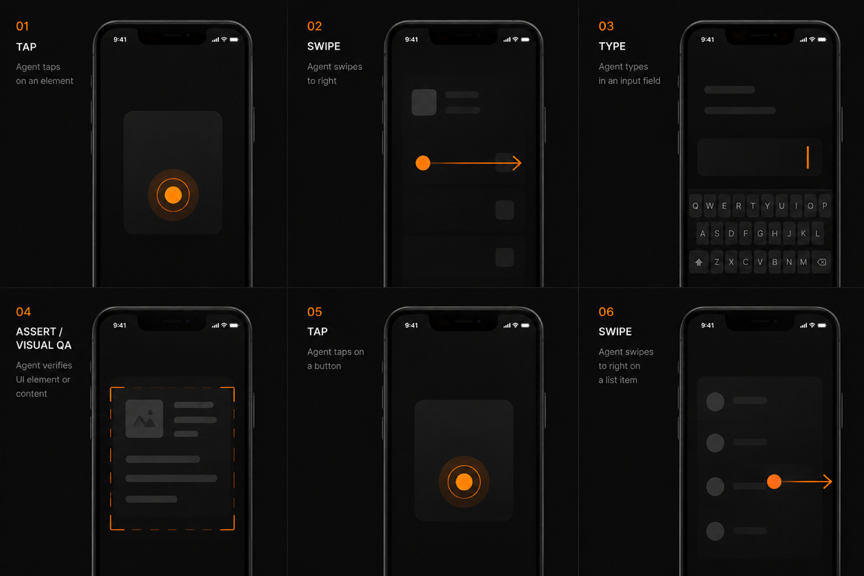
Tap, swipe, type and screenshot; read the accessibility tree and assert on labels instead of diffing pixels.
- 04
Fan out & record
Boot a whole matrix per PR, record 60fps MP4s for the runs that fail, and attach them to the job.
CapabilitiesEverything a device does, as an API.
- 01
Agent-drivable
Tap/type/screenshot and the accessibility tree as first-class SDK calls, not a Selenium wrapper.
- 02
Bring your suite
Open an Appium, XCUITest or ADB tunnel and point your existing tests at the endpoint.
- 03
Device matrix per PR
Fan out iOS and Android from one config; every device bills separately, by the second.
- 04
Camera injection
Feed a fixed clip or a live webcam into the camera so scan and QR flows run the same frames.
- 05
60fps recording
Capture the run behind a signed URL and attach it to the failing job.
- 06
Embed or share
Drop a live device into your product, or send a signed link to a reviewer.
Built on SandalThe products that power it.
Mobile testing runs on Sandal’s device and build surfaces.






1from sandal import Sandbox
2
3# boot a desktop the agent can see
4vm = Sandbox.create(desktop=True)
5vm.screenshot("before.png")
6
7vm.click(x=412, y=280)
8vm.type("hello from the agent")
9vm.key("cmd+s")
10
11# read the screen back
12frame = vm.stream.latest()
13assert frame.contains("Saved")
➜ sandbox sandal desktop --stream
connecting to vm_7c31…
✓ stream open · 60fps · 18ms latency
screenshot → before.png
click(412, 280) · type · cmd+s
✓ saved
➜ sandbox




Give your tests a real device.
iOS simulators and Android emulators, driven by your agent or your suite, per second per device.